Free & open-source WordPress plugin
Find and fix accessibility issues, right in wp-admin.
Accessibility Guardian checks every page of your WordPress site against WCAG 2.2 Level AA with the axe-core engine and tells you exactly what to fix, where, and how. No external service, no account, nothing to install on the server.
Submitted to the WordPress.org plugin directory; the listing will appear there once the review is complete.
- WCAG 2.2 A & AA
- WordPress 6.4–7.1
- PHP 8.0–8.5
- Multisite
- GPL-2.0-or-later
- No external service. Scans run in your browser, on your own site.
- Real pages. Checks the final rendered HTML, whatever theme or builder made it.
- Actionable. Every issue shows the element, its HTML and a fix.
- Open source. GPL licensed, tested on PHP 8.0 to 8.5.
How it works
From scan to fix in three steps
-
Scan
Start a full-site scan from Accessibility Guardian → Run Scan, or scan a single page from the toolbar while you view it. Each page loads in a hidden frame and axe-core checks the real, rendered result.
-
Review
Get a 0–100 score and a list of issues sorted by severity. Each one shows the page, the element, its HTML, the WCAG success criterion and a link to documentation.
-
Fix
Follow the recommended fix for each issue, switch on optional automatic fixes for common problems, then scan again and watch the score improve over time.
Features
Everything you need to audit a WordPress site
-
Real rendered-page analysis
axe-core 4.10 runs against the fully rendered page, so computed colour contrast, ARIA states, theme markup and page-builder output are all taken into account.
-
WCAG 2.0, 2.1 and 2.2
Choose Level A or AA. Optional best-practice checks catch skipped heading levels, missing main headings and content outside landmarks.
-
Checks axe-core doesn't cover
Generic link text such as “click here”, form fields that rely on a placeholder, links that open new windows without warning, and linked PDFs.
-
Actionable issues
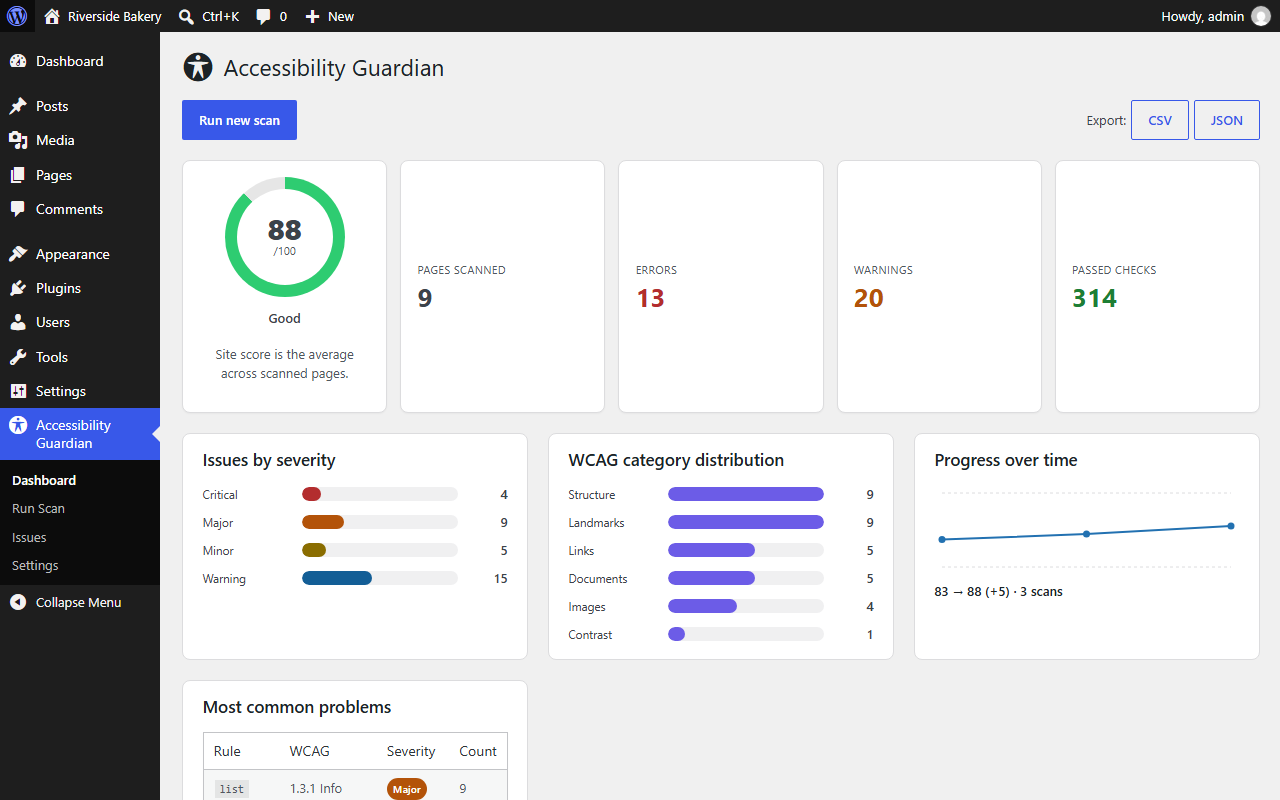
Severity, WCAG reference, page, CSS path, HTML snippet, a recommended fix and documentation for every finding, filterable by severity.
-
Score and progress
A 0–100 site score with Excellent, Good, Needs Improvement and Poor bands, plus a chart of how it changes from scan to scan.
-
Optional automatic fixes
Nine small, opt-in fixes: skip link, visible focus, underlined links, language attribute, new-window warnings, zoom and more.
-
CSV and JSON export
Export any scan for your team, your client or your audit records.
-
Multisite and developer hooks
Per-site or network activation, plus filters and actions to change the URL queue, axe-core options and required capability.
Screenshots
See it in action
Real screenshots from WordPress 7.1, taken on a small demo site with typical accessibility problems.
-
Dashboard: site score, severity breakdown, WCAG categories and progress over time. -
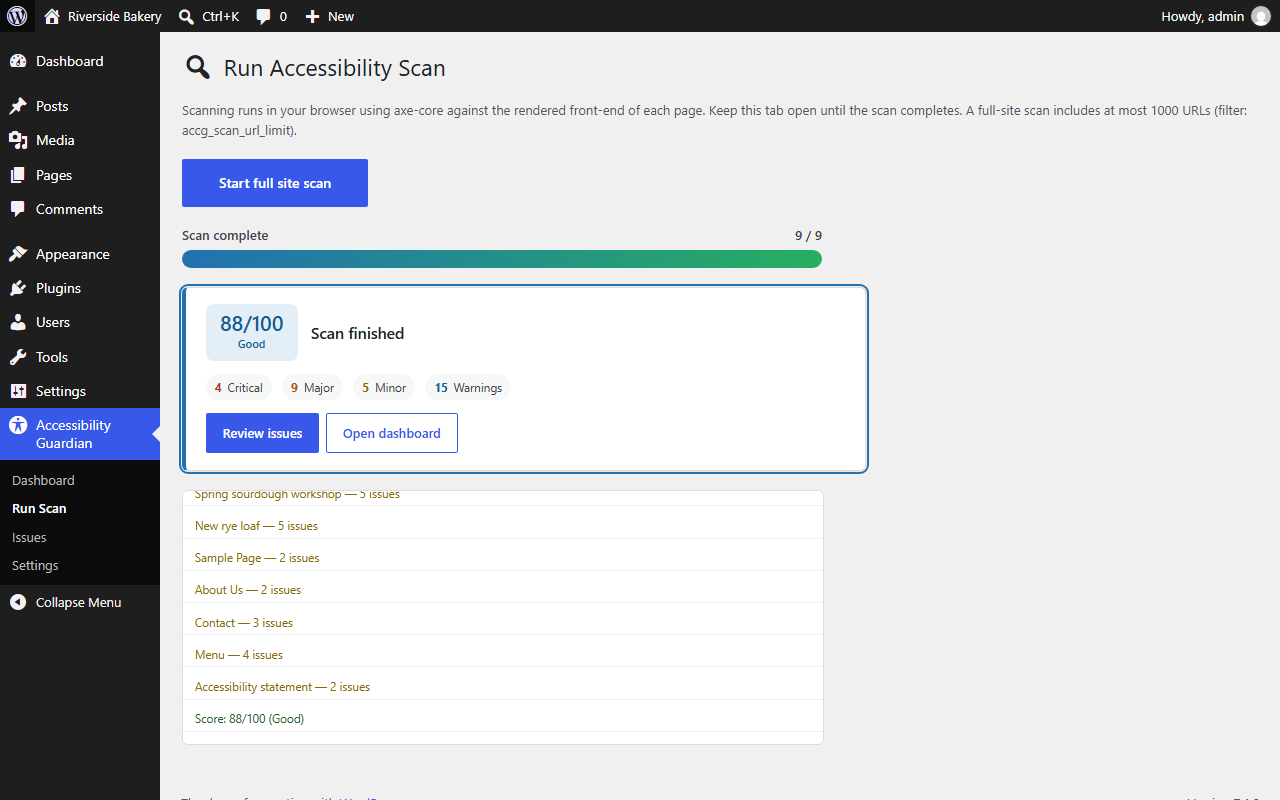
A completed full-site scan with the score summary and per-page log. -
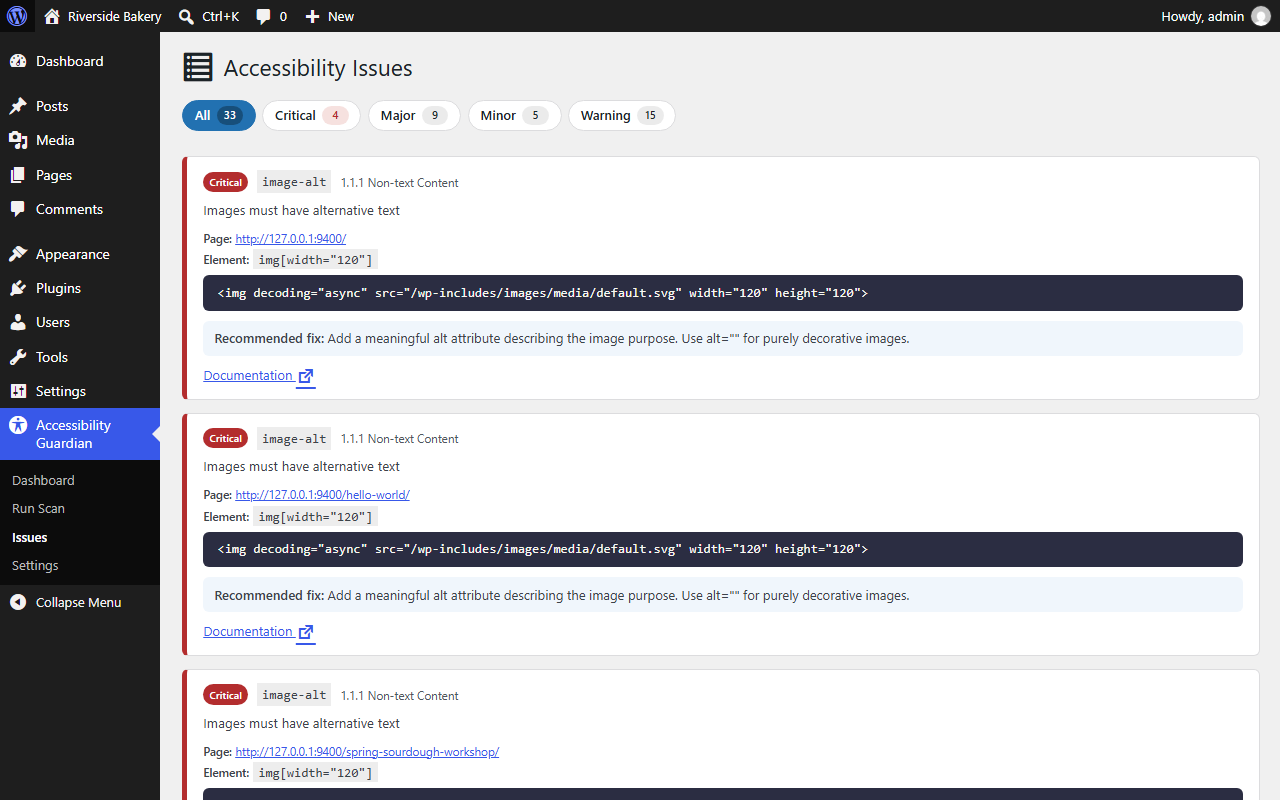
Issues: every finding with its WCAG reference, element, HTML and recommended fix. -
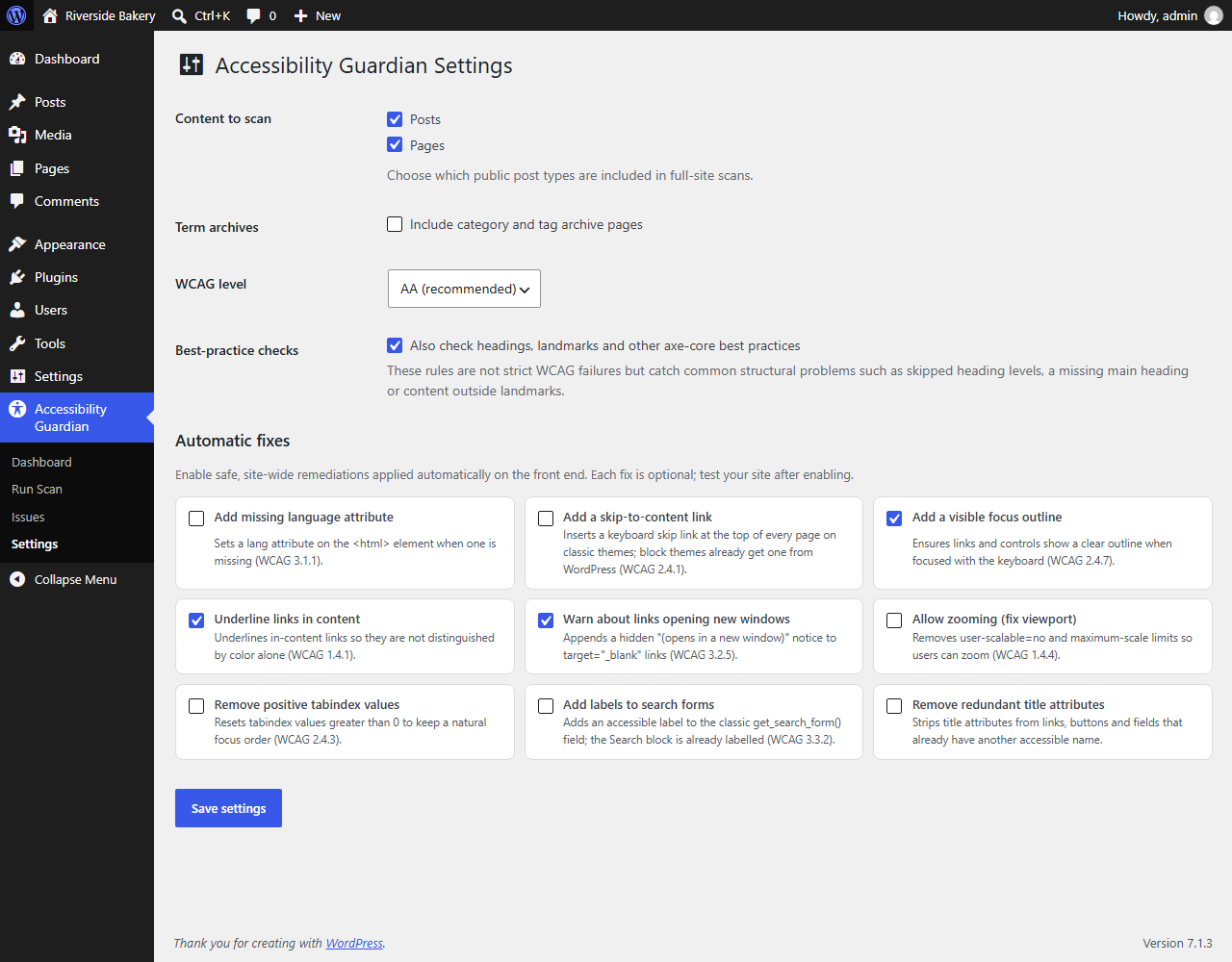
Settings: content to scan, WCAG level, best-practice checks and automatic fixes.
Scoring
A score you can explain
Every scanned page starts at 100 and loses points for each issue, never going below 0. The site score is the average of all scanned pages, so one problem page does not hide an otherwise good site.
- Excellent 95–100
- Good 80–94
- Needs improvement 60–79
- Poor below 60
| Severity | Penalty | Typical examples |
|---|---|---|
| Critical | −10 | Missing image alt text, unlabelled buttons, missing page language |
| Major | −5 | Low contrast, missing form labels, broken list structure |
| Minor | −2 | Generic link text, placeholder-only fields |
| Warning | −1 | Items for manual review, best-practice findings, PDFs |
Automatic fixes
Quick wins, only when you want them
All fixes are off by default. They use WordPress hooks and small front-end assets; your theme files are never edited. Turn on one at a time and check your site.
| Fix | What it does | WCAG |
|---|---|---|
| Language attribute | Sets lang on <html> when the theme leaves it out | 3.1.1 |
| Skip-to-content link | Adds a keyboard skip link on classic themes (block themes already have one) | 2.4.1 |
| Visible focus outline | Shows a clear outline on focused links and controls (keyboard only) | 2.4.7 |
| Underline links | Underlines links in content, leaving buttons and menus alone | 1.4.1 |
| New-window warnings | Adds a hidden “(opens in a new window)” to target="_blank" links | 3.2.5 |
| Allow zooming | Removes user-scalable=no and maximum-scale limits | 1.4.4 |
| Positive tabindex | Resets tabindex values above 0 to keep a natural focus order | 2.4.3 |
| Search form labels | Adds an accessible label to the classic search form | 3.3.2 |
| Redundant titles | Removes title attributes that duplicate another accessible name | — |
Privacy
Your site, your data
- Scans run on your own site and in your own browser. Page content and results are never sent to the plugin author or any third party.
- Results are stored in your WordPress database and removed when you delete the plugin, on every site of a network.
- Nothing loads on your front end unless you switch on an automatic fix.
- No account, no API key, no tracking.
An honest note about automated testing
Automated tools, including this one, find a large share of common problems quickly, but not all of them. Some WCAG requirements, such as meaningful alternative text, reading order and captions, can only be checked by a person.
Accessibility Guardian helps you find and fix issues faster. It does not certify that a site is accessible or legally compliant with the ADA, the European Accessibility Act, EN 301 549 or Section 508.
For developers
Hooks to make it yours
| Hook | Purpose |
|---|---|
accg_scan_urls | Change the full-site URL queue |
accg_scan_url_limit | Maximum URLs per full-site scan (default 1,000) |
accg_axe_options | Options passed to axe.run() |
accg_required_capability | Who can scan and see reports (default manage_options) |
accg_skip_link_target | Target of the skip-link fix |
accg_scan_completed | Action fired when a scan finishes |
// Let editors run scans and see reports.
add_filter( 'accg_required_capability', fn () => 'edit_others_posts' );

// Email the site admin when a scan scores below 80.
add_action( 'accg_scan_completed', function ( int $scan_id, array $totals ) {
	if ( $totals['score'] < 80 ) {
		wp_mail(
			get_option( 'admin_email' ),
			'Accessibility score dropped',
			sprintf( 'Scan #%d scored %d/100.', $scan_id, $totals['score'] )
		);
	}
}, 10, 2 );Get started
Install in a minute
- Download accessibility-guardian-1.2.0.zip from the latest release.
- In WordPress, go to Plugins → Add New Plugin → Upload Plugin, choose the zip, then click Install Now and Activate.
- Open Accessibility Guardian → Run Scan and click Start full site scan. Keep the tab open until it finishes.
Please use the release zip, not GitHub's green “Download ZIP” button: that archive is the development repository and unpacks to the wrong folder name.
Requirements
- WordPress
- 6.4 or later, tested up to 7.1
- PHP
- 8.0 or later, tested on 8.0–8.5
- Browser
- Any current Chrome, Edge, Firefox or Safari
- Framing
- Pages must allow same-origin frames.
X-Frame-Options: SAMEORIGINis fine;DENYblocks scanning. - Server
- Nothing extra: no Node.js, headless browser or API key
FAQ
Frequently asked questions
Does this make my site compliant with the ADA or the European Accessibility Act?
No tool can do that on its own. Automated checks catch many common problems quickly, but some WCAG requirements can only be verified by a person. Use the report to fix what is found, then test key pages with a keyboard and a screen reader.
Does scanning need anything installed on the server?
No. The scan runs in the administrator's browser using a hidden frame on your own site, so standard WordPress hosting is all you need.
Why must I keep the tab open during a scan?
The axe-core engine runs in your browser, one page at a time. If you close the tab, the scan stops. You can cancel at any time; a cancelled scan keeps its partial results but does not replace your latest complete report.
A page could not be scanned. Why?
Usually the page cannot be shown in a frame because of X-Frame-Options: DENY or Content-Security-Policy: frame-ancestors 'none', it took longer than 30 seconds to load, or a very strict Content Security Policy blocked axe-core. The rest of the scan continues normally.
Will the WordPress toolbar show up in my results?
No. Pages are scanned as the logged-in administrator, so the toolbar is present, but it is excluded from every check.
Does it slow down my site for visitors?
No. Nothing loads on the front end unless you enable an automatic fix. Enabled fixes add one small stylesheet and, for some fixes, one small deferred script.
Does it work with page builders, block themes and multisite?
Yes. It checks the final rendered HTML, whatever produced it, and the automatic fixes are aware of block themes. On multisite you can activate it per site or network-wide; each site keeps its own settings and results.
What's new
Version 1.2.0
- Tested with WordPress 6.4–7.1 and PHP 8.0–8.5; Plugin Check reports no errors or warnings.
- Best-practice checks for headings, landmarks and page structure.
- “Scan accessibility” toolbar link for one-click single-page scans.
- Full multisite support and four new developer hooks.
- The WordPress toolbar is no longer included in results; messages keep element names like
<ul>. - The plugin's own admin screens pass axe-core WCAG 2.2 AA checks.
Make your WordPress site easier for everyone to use
Free, open source and private by design.